

CastKey
Play mobile games with keyboard & mouse on PC.
No laggy emulator required · Instant response · Plug & play.
3 Simple Steps to Play Mobile Games on PC
No expensive hardware adapters. No complicated setup. All you need is your PC and a USB charging cable.
Connect phone via USB cable
Plug your phone's charging cable directly into any USB port on your PC or Laptop.
Enable USB Debugging on phone
Open phone Settings → Developer Options → Turn ON USB Debugging. Tap 'Always allow' on phone prompt.
Launch game and play
CastKey automatically detects your game and loads competitive keymaps (Free Fire, PUBG, MOBA...). Play right away!
Smart In-Game Hotkeys
Essential shortcuts to master every match in CastKey:
Why CastKey Over Traditional Emulators?
Superior gaming experience, runs smoothly even on low-end laptops:
Play Directly on Mobile Hardware, No Emulator Needed
Games run 100% natively on your smartphone. PC only mirrors the screen and forwards USB keyboard & mouse inputs with zero lag and absolute safety.
Instant Response Under 15ms via USB Cable
Keyboard and mouse signals transmit directly through the USB cable to your phone. Instant key registration with zero lag and no wireless delay.
No Game Tampering, Zero Ban Risk
No phone rooting required, no modified APKs. Games recognize input as standard external mouse and keyboard hardware.
Zero PC Burden, Smooth on Weak Laptops
Your phone handles all 3D graphics while your PC uses only ~80MB RAM for display. No overheating, no PC freezing, no memory leaks.
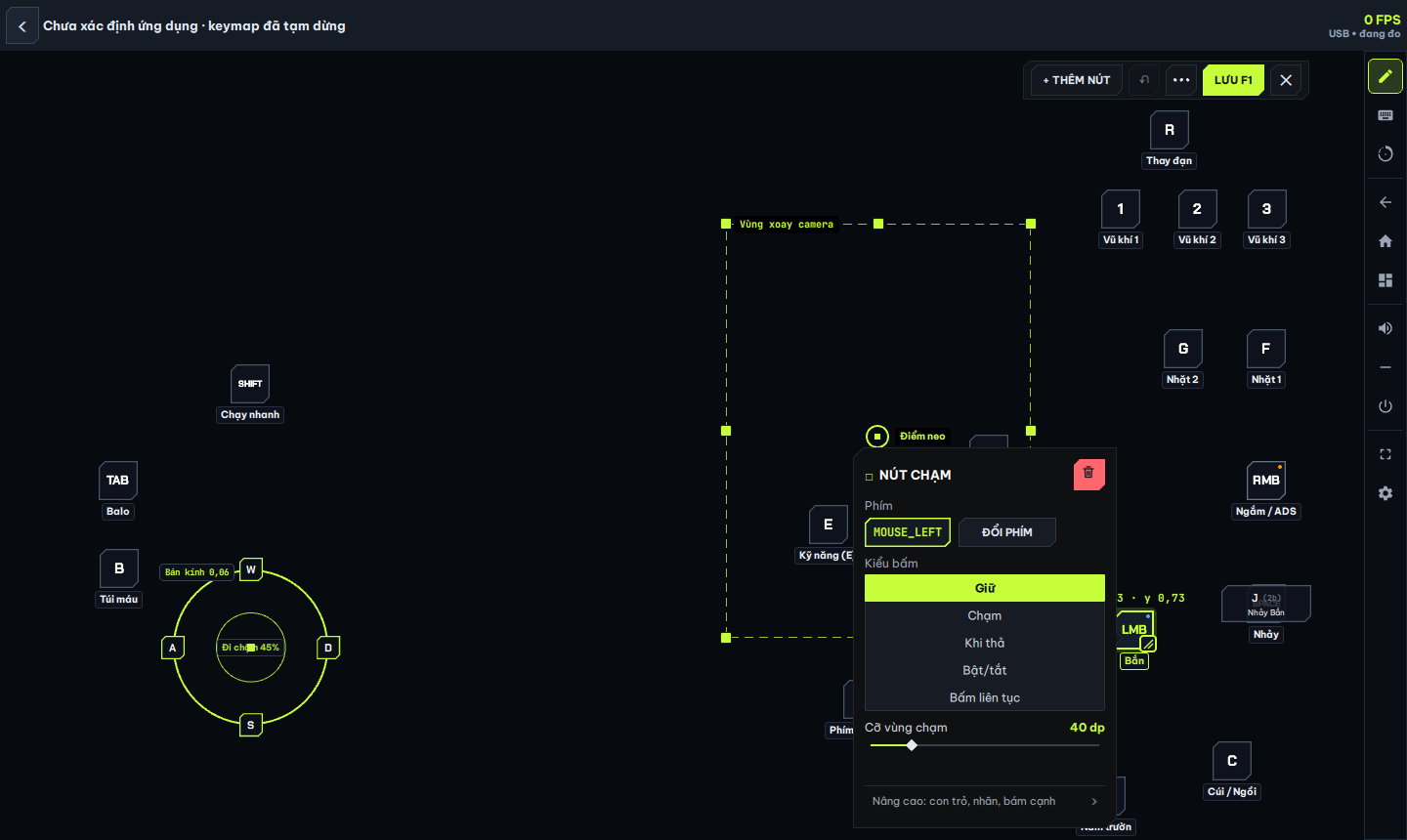
Customize Keymaps & Crosshairs Directly on Screen
Freely drag and drop key locations, assign shortcuts, and fine-tune X/Y mouse sensitivities directly in the desktop app. Settings auto-save per game.
F12 opens visual keymap editor
• Key Ctrl toggles mouse cursor to loot
• Key F4 opens crosshair & sensitivity settings
• Key F1 quick saves keymap profile
CastKey Native USB vs. Android Emulators
| Critical Metric | CastKey USB (Physical Device Control) | Android Emulators (BlueStacks / LDPlayer) |
|---|---|---|
| 1. Matchmaking Pool | 100% Mobile Player Matchmaking (never relegated to PC emulator queues). | Flagged as emulator; restricted strictly to PC queues. |
| 2. Account Safety (Anti-Ban) | Zero APK modifications, zero RAM hooking → 100% Account Safe. | Vulnerable to VM environment heuristics and automated ban waves. |
| 3. PC Hardware Overhead |
Only ~80MB RAM usage (runs smoothly at 120 FPS even on Core i3 without discrete GPU).
CastKey RAM:
80 MB
PC CPU: 1.8%
FPS: 120 FPS
Latency: 1.1ms
|
Consumes 4GB – 8GB RAM and strains CPU/GPU to emulate Android.
Emulator RAM:
4,680 MB (4.6 GB)
PC CPU: 39%
FPS: 54 FPS
PC Temp: 60°C
|
| 4. Thermals & Battery Health |
Proprietary Physical Screen Off mode keeps phone at 34–37°C and preserves battery health.
Phone Temp: 34.3°C (Cool · Screen Off)
|
PC fans run at full speed; heavy thermal throttling causes stutter during intense fights.
PC Fan Speed: 2,500 RPM (Quiet Fan)
|
Pro Cloud Keymap Repository
Copy the keymap code below and paste it directly into CastKey Desktop on Windows to apply pro bindings instantly.
PUBG Mobile 4-Finger Pro Preset
WASD move · Q/E lean · 1/2/3 weapons · 4/5 grenade/med · C/Z crouch/prone · F/G loot · Tab backpack · Ctrl mouse.
CK-PUBG-4FINGER-2026
Free Fire Fast Gloo Wall Preset
E / V / M4 1ms Gloo Wall · C Crouch gloo · Q Quick switch · G Active skill · 5 Medkit · Sens Y 1.35x Drag aim.
CK-FF-GLOO-2026
MOBA Smartcast Cursor-Aim Preset
Q / W / E / R 4 skillshots aimed by cursor · D / F Flash/Smite · B Recall · C Heal · 1/2 Active items · Space Basic attack.
CK-AOV-SKILL-S9
ARPG Spiral Abyss / Tower of Adversity Preset
1 / 2 / 3 / 4 Swap 4 characters · E Elemental Skill · Q Burst · Shift / M2 Dodge · F Interact · R Aim bow · M Map.
CK-GENSHIN-ABYSS-12
Frequently Asked Questions About Gaming
Everything you need to know before downloading and enjoying CastKey.
Can playing with CastKey get my account banned?
Absolutely not. Games run natively on your real phone. CastKey only routes mouse and keyboard signals over USB without modifying game files. You match normally with mobile players.
How is CastKey different from Android emulators?
Emulators eat 4GB - 8GB RAM and get queued into emulator-only lobbies. CastKey uses only ~80MB RAM on PC, runs smooth on any potato PC, and matches 100% with mobile players.
Can low-end office PCs and laptops run CastKey?
Smoothly and effortlessly. Any office laptop or older Core i3 PC with a standard USB port can mirror at 60 - 120 FPS without requiring a dedicated graphics card.
Does long-time USB gaming cause overheating or battery degradation?
Zero overheating worries. CastKey automatically turns off your physical phone screen while playing on PC, reducing temperature by 4-6°C and maximizing battery longevity.
How do I import community Cloud Keymap codes?
Very simple: Launch CastKey on PC → select Keymap Settings → Import Cloud Code (e.g. CK-FREEFIRE-2026). All key placements and sensitivity settings auto-configure instantly.
Which phone models are supported?
Supports all Android smartphones (Samsung, Xiaomi, OPPO, Realme, Vivo, ROG Phone...) running Android 8.0+ as well as iPhone / iPad via USB cable or wireless AirPlay.
Frequently Asked Questions
Does CastKey require root access?
No root required. For Windows, enable USB Debugging and connect your phone to the PC. For standalone Android OTG, connect a keyboard and mouse through OTG and grant the permissions requested in the phone app.
Where are keymap settings configured?
Each app manages its own controls, sensitivity, permissions, and local profiles. The website provides downloads, your shared account and Pro entitlement, and cloud keymap codes for manual import.